
Log4j&Logback使用笔记
Updated:
log4j的主要组件如下图: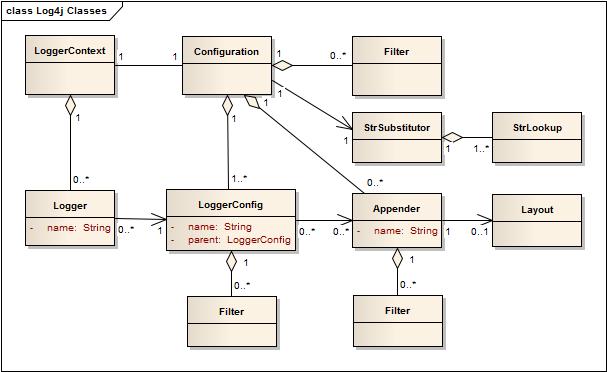
定义一个logger
private static final Logger logger = LogManager.getLogger(AndroidQueryServiceImpl.class);
LogManager.getLogger会指定logger的名称。一般取类的名称,也可以指定特定的名称,如:private static final Logger tracerlogger = LogManager.getLogger("tracer-business");
如果取相同的名称,则x,y指向同一个logger对象,如:1
2Logger x = LogManager.getLogger("wombat");
Logger y = LogManager.getLogger("wombat");
logger的配置 – 决定输出级别
- logger的日志级别分为TRACE, DEBUG, INFO, WARN, ERROR, and FATAL。
- logger的日志级别有继承关系。如果x是y的父类,则y继承x的日志级别,除非重新指定。
- 继承时会继承关系最近一级指定的级别,如:
| Logger name | Assigned level | Effective level |
|---|---|---|
| root | DEBUG | DEBUG |
| X | INFO | INFO |
| X.Y | none | INFO |
| X.Y.Z | ERROR | ERROR |
appender的配置 – 决定输出位置
- 一个logger可以被输出多次,取决于其appender的配置。
- 一个logger L的输出状态会被它的appender以及其祖先的appender的状态决定。这被称为“appender additivity”。
- 因此,如果不想继承其上部分的appender的状态,需将“additivity flag”设置为false。(否则可能会导致相同日志输出好几遍)
- However, if an ancestor of logger L, say P, has the additivity flag set to false, then L’s output will be directed to all the appenders in L and its ancestors up to and including P but not the appenders in any of the ancestors of P. Loggers have their additivity flag set to true by default.
| Logger Name | Attached Appenders | Additivity Flag | Output Targets | Comment |
|---|---|---|---|---|
| root | A1 | not applicable | A1 | Since the root logger stands at the top of the logger hierarchy, the additivity flag does not apply to it. |
| x | A-x1, A-x2 | true | A1, A-x1, A-x2 | Appenders of “x” and of root. |
| x.y | none | true | A1, A-x1, A-x2 | Appenders of “x” and of root. |
| x.y.z | A-xyz1 | true | A1, A-x1, A-x2, A-xyz1 | Appenders of “x.y.z”, “x” and of root. |
| security | A-sec | false | A-sec | 因为设置了false, 只会使用 appender A-sec。 |
| security.access | none | true | A-sec | 继承父类,只会使用 appender A-sec,因为其父类设置了false. |
layout的配置 – 决定输出格式
PatternLayout可以指定输出日志的格式,如:%d{yyyy-MM-dd HH:mm:ss.SSS} [%X{requestURIWithQueryString}]%-5level %logger{20} - %msg%n
各参数的含义详见: conversionWord
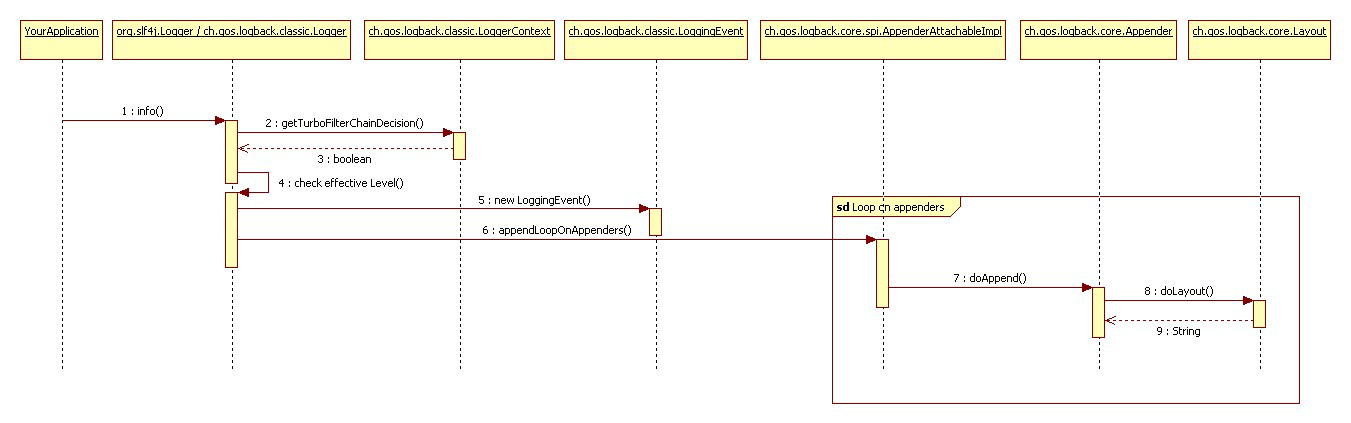
logger工作流程
以打印logger.info("The new entry is {}.", entry);为例
- 先过fliter信息,如Marker, Level, Logger,message等。若通过,则进行下一步。
- 判断effective logger与当前logger等级的关系。如通过,则进行下一步。
- 创建loggingEvent对象,包括当前logger的信息,比如当前时间,线程,级别,logger等信息
- 引用appenders
- 格式化输出
- 将loggingEvent输出到对应的appenders
一些注意点
- 当加入多个参数时,如
logger.debug("Entry number: " + i + " is " + String.valueOf(entry[i]));
不管该日志是否会被打印出来,都会进行参数的拼接。因此为了减小开销,可以用isDebugEnabled()先判断一下
1 | if(logger.isDebugEnabled()) { |
使用{}进行format则可以提升性能。在debug被禁止的情况下,用2比1快30%。(format先判断再替换)
1
2logger.debug("The new entry is "+entry+".");
logger.debug("The new entry is {}.", entry);如果需要多个参数(2个以上),可以使用一个array。如果在后面使用多个元素,其实也是调用的array方法,一样的。
logger.debug("Value {} was inserted between {} and {}.", paramArray);落本地盘比较快,落数据库慢
- 使用量大的循环里尽量不要打log
- 打印error堆栈信息的时候,可以用logger.error(“error :”, e); 而不要用 logger.error(“error” +e); 否则打印不出堆栈。
logger.error(String msg, Throwable t)自己实现了e.printStackTrace();
和用stringBuilder写for循环相比,应该也不会占用很多资源。(没有实际验证过)
1 | public ThrowableProxy(Throwable throwable) { |